
With more people than ever enjoying the flexibility of remote work, and broadband technology improving, much of the world can be your office. What about cruise ships though? Working from cruise ships may be possible for some, but it’s critical to understand whether it’s possible for you, before setting sail.

Is The WiFi Good Enough to Work Remotely on a Cruise Ship?
The majority of cruisers now connect to the internet during their cruise, though the methods and technologies vary, and if you’re a remote worker, a reliable internet connection is more then a connivence item. While delivering fast and reliable internet to ships is tricky, involving complex satellite and other systems, the technology has improved a lot in recent few years. Whether or not it’s sufficient however, largely depends on the line you’re sailing, and where.

Location Matters
Where your cruise sails impacts your ability to stay connected a lot less than it used to- but it's still a factor. This is because one of the biggest providers of connectivity, SES, has poorer quality coverage north of the 49th parallel. The use of Starlink as well as other improvements have helped this a lot, but cruisers sometimes still find that connection speed and reliability is better in the Caribbean than Alaska, or Norway, for example. Does this mean you can't work on your Alaskan cruise? No, but if you're used to cruising the Caribbean, know there may be differences.
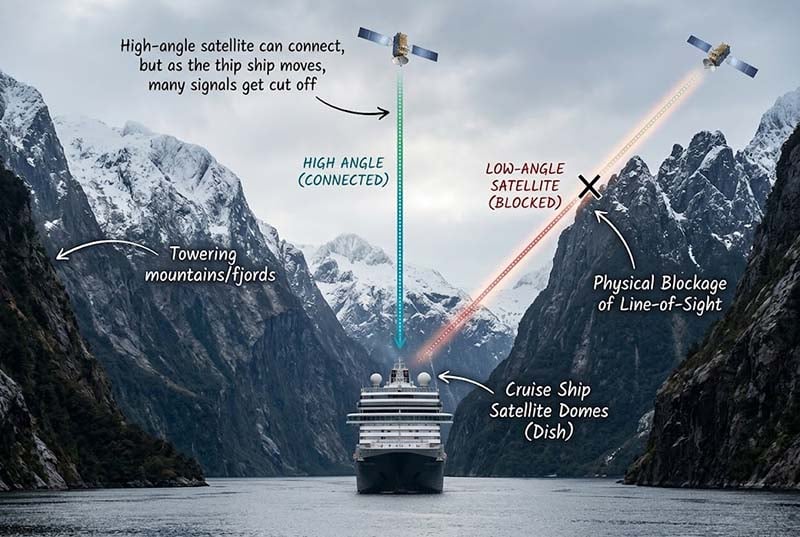
Other geographic considerations are being in fjords or other areas where there are many obstructions a lot higher than the horizon. Look up at the sky when you're next to a tall mountain - you see less of the sky, and that's where the satellites are. This is the same reason your phone's GPS works poorly walking through downtown areas with tall buildings. If you’re cruising the Caribbean however, this shouldn’t be a factor at all.
Differences in Internet Access between Cruise Lines
A few years ago there were some lines you could have reasonably reliable internet on, and others you simply could not. That's mostly changed, in that every ocean cruise line I've sailed on since 2022 or so has been easy to stay connected on, save for some isolate technical problems. Whether or not you're able to work, however, depends on what you actually need to work. Mostly, I'm talking about VPN access.
Some think of privacy and location-shifting VPN services like TorGuard or Nord VPN, but corporate VPNs are used by some companies as part of their security protocol, where leveraging a specially configured VPN on a work device is required in order to access internal systems and resources. If your company requires VPN access, then know there are certain cruise lines that prevent VPN connections from working. There is a workaround, however, which we'll discuss near the end of this article.
Cruise Lines That Block VPN Access
MSC and Carnival Cruise Line have various measures in place that make it all but impossible for most people to connect to a VPN via their shipboard WiFi. These blocks aren't perfect, so if your friend swears they were able to connect, that's great, but it doesn't mean you'll be able to.
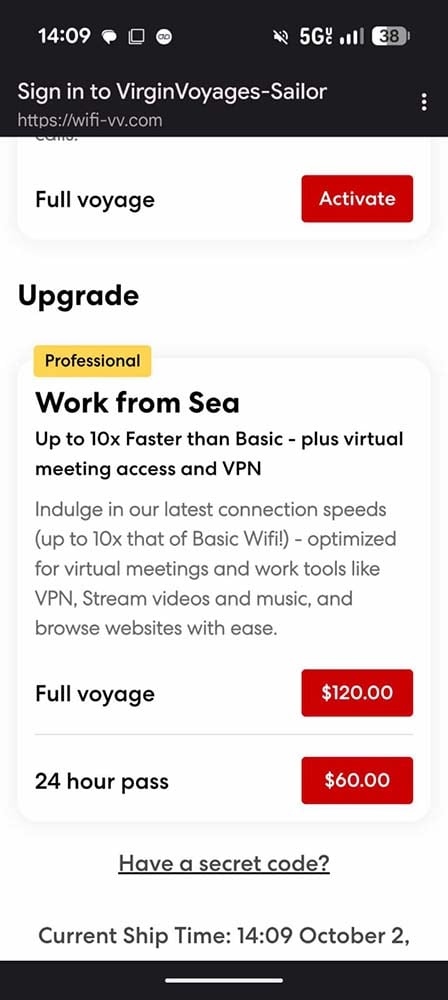
Most other cruise lines I've tested this on are fine with VPNs, but there is one notable caveat: Virgin Voyages. On Virgin, VPN access is limited to their Work from Sea package. Even their Premium package that allows streaming doesn't allow VPNs. While working from any line will require their highest level package, on Virgin this package is particularly pricey - more than $60 per day in some cases. To be clear, if you don't need VPN access, their Premium package may be okay - though the speeds tend to be much nicer with Work from Sea.
Will My Employer be Okay with Me Working from a Ship?
While some companies have long embraced remote work, and are content as long as quality work is done – regardless of where the keyboard strokes were made - others are still skeptical about productivity outside of an office building. Your boss may be just fine with you working from home, or even a coffee shop, because they’re comfortable with you doing your job in that environment. If you sign onto a Zoom call and there is a pool in the background, or some other setting that looks a lot more like vacation than work, how will they feel?

Additionally, HR and/or IT policies may not be okay with you working outside of your home country, which is something reasonably easy for them to detect. When connecting on a cruise ship, the country it appears you're in can be rather unpredictable.
Whether this is a problem for you isn’t a question we can answer, of course, and it could be worth broaching the subject with your boss before committing to working from a cruise ship. Others may choose to keep this decision quiet as to not ruffle feathers or risk being told it’s not permitted - even for those with the discipline to be productive during work hours. Keeping it a secret may not be easy though, as not only might someone notice a different background on a teleconference, or where you're computer is connecting from, but if you or your family will be sharing parts of your trip on social media – or telling any other co-workers, it’s safe to assume your employer will find out you’re on a ship.

Is Working from a Ship Mentally Difficult?
It sure can be. We’ve done this several times, and it’s fantastic knowing that when work is done, you’re on a cruise! It’s also great knowing that you can head up to the café and work from there for a bit or sit out on deck and be productive while enjoying the views. There is, however, massive temptation, and fear of missing out (FOMO, as people hipper than I might say). Knowing that there are so many great options for entertainment and relaxation just steps away, but that you’re stuck working can be mentally taxing and a bit torturous - especially while you know others are enjoying those options on the ship.

Honestly, each time I work from a ship I question if it’s more of a tease than it’s worth. For me, I conclude it is worth it, because I get to cruise more and not fall behind on work. If I was only taking a cruise every year or two as a big vacation, I’d not at all want to compromise my experience by putting work into the mix.
Redundancy and Contingency Plans for Remote Work from a Cruise Ship
If I’m at home any my computer has an issue, I have options. Maybe I have a second laptop, and at worst, my company can overnight me a new laptop. If my internet goes down, I can tether to my phone, or go to a coffee shop with WiFi. On a ship, those aren't generally options. I should note on Celebrity Cruises' ships, they have iLounges, which are “Value Added” Apple retailers where you can actually buy laptops - but most companies require you work from their devices. Either way, it's best not to test how margarita-resistant your laptop is.

Obviously a fast and reliable internet connection, as discussed previously, is also critical. If the ship's connection goes down and you're in port, then depending on your itinerary, there’s a good chance that mobile internet works well - at least near the port. Becoming familiar with your cellular data roaming options (speed and cost) is a good idea. In fact, you could even turn this into a hybrid approach, and only commit to work some days, when you’re in a port that you’re okay not exploring. You can also ask crew members what locations near the port have good, cheap (or free) internet access, in case you want to work from a café or other spot near the ship.

Backup Internet on Cruise Ships
If the ship's connection is having issues while you're at sea, or you find you can't connect your corporate VPN connection, there is now another way. Ships have long had onboard cellular networks, but they were slow and prohibitively costly to roam on. Recently, however, companies like GigSky and OneRoam (as well as RedBull Mobile for Brits) offer cellular plans that, while they still come at a premium, are much more affordable than years past. I tested GigSky a couple years ago and was impressed.
Depending on the exact reason the ship's internet is giving you problems, these solutions may or may not work. If the local network is the problem, you're in luck - but if there's a major satellite connectivity issue that both services rely on, not so much. Additionally, you'll need to have an unlocked phone (not one strictly locked to one carrier) to use these services - but they're worth checking out in advance so you know your options.
Don’t Forget to Enjoy Your Time
If you decide to work from a cruise ship, make sure you do everything possible to not overwork and enjoy your time. You don’t want to pay money and pack up so that you get just a couple hours a day to enjoy. Additionally, enjoy the time you are working. Remember that you can take your lunch hour in a nice restaurant onboard, or maybe get a quick bite at the buffet and then lounge by the pool for 40 minutes! Don’t get stuck working from your stateroom. Every cruise ship I’ve sailed on has many quiet spaces where you could easily set up a portable office space so that you can enjoy a change of scenery.

If you need to plug in for power, ask crew members – you might be surprised that there are outlets handy which you’ve not noticed. It’s worth packing a European power adapter though, since many of the outlets in public spaces are 220 volt European plugs, and one of these adapters will give you additional plugs in your stateroom.

At the end of the day, you want to spend as little time working from the ship as possible while still being productive, and if you do it right, you might just find that this is a great method of getting away a bit more frequently, and really embracing the possibilities of remote work.
- Log in to post comments